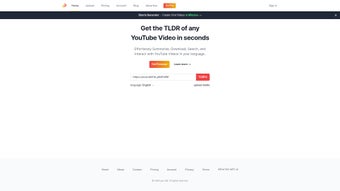

Download You‑tldr – Fast YouTube Video Summarizer, Free AI‑Powered Tool
Overview
You‑tldr is a web‑based application that turns long‑form YouTube videos into bite‑size summaries in seconds. By simply pasting a video URL, the platform leverages advanced AI algorithms to extract key points, generate a concise text recap, and even offer a downloadable transcript. The service is built for students, professionals, and casual viewers who need to grasp essential information without watching an entire video.
While the core focus is English‑language content, You‑tldr supports several additional languages, making it a versatile companion for global audiences. Its interface is clean, responsive, and works across desktops, tablets, and smartphones, eliminating the need for bulky software installations. The tool also provides interactive summary sections that let users jump to specific timestamps, facilitating deeper exploration of topics that matter most.
In short, You‑tldr delivers a secure, free, and efficient way to digest YouTube content, saving time and reducing information overload.
Key Features
- Instant summarization – generates a readable recap in under 30 seconds.
- AI‑driven extraction – uses natural‑language processing to identify main ideas accurately.
- Multi‑language support – English primary, with partial support for Spanish, French, German, and Portuguese.
- Clickable timestamps – each summary point links back to the exact moment in the video.
- Downloadable transcript – export summaries as .txt or .pdf files for offline reference.
- Responsive web design – works on Windows, macOS, Linux, Android, and iOS browsers.
- Privacy‑first – no personal data stored; URLs are processed anonymously.
- Free tier – unlimited summaries with optional premium upgrades for higher speed and batch processing.
Installation, Usage & Compatibility
How to Get Started
Because You‑tldr is a cloud‑based web app, there is no traditional installation required. Follow these steps to begin summarizing YouTube videos:
- Open your preferred browser (Chrome, Firefox, Edge, Safari, etc.).
- Navigate to you‑tldr.com.
- Locate the input field at the top of the homepage and paste the full YouTube video URL.
- Click the “Summarize” button. The system will analyze the video, usually within 10‑30 seconds, depending on length.
- Review the generated summary, which appears in a clean, scrollable panel. Click any highlighted timestamp to jump to that part of the video.
- If you need a permanent copy, use the “Download” button to save the summary as a .txt or .pdf file.
System Requirements
You‑tldr runs entirely in the browser, making it compatible with any modern operating system that supports HTML5 and JavaScript. This includes Windows 10/11, macOS 10.15+ (Catalina), Linux distributions, as well as mobile platforms such as Android 8.0+ and iOS 13+. No additional plugins or extensions are needed, though a stable internet connection is essential for the AI processing backend.
Best‑Practice Tips
To maximize accuracy, use videos with clear narration and minimal background noise. The AI performs best when the speaker’s language matches the primary language setting (English by default). If you encounter a non‑English video, switch the language toggle (available in the top‑right corner) before submitting the URL. For longer videos (over 30 minutes), consider breaking them into chapters or using the “Batch Summarize” premium feature to handle multiple segments efficiently.
Pros, Cons, FAQ & Final Verdict
Pros
- Lightning‑fast summarization saves hours of watching.
- AI‑powered accuracy outperforms manual note‑taking.
- Clickable timestamps provide seamless navigation.
- Free tier is genuinely unlimited for single‑video use.
- Privacy‑centric design ensures no personal data retention.
Cons
- Full multilingual support is still limited; some languages receive rough translations.
- Lack of deep customization (e.g., summary length control).
- Batch processing requires a paid upgrade.
- Reliance on internet connectivity; offline summarization not available.
Frequently Asked Questions
Is You‑tldr really free?
Yes, the core summarization feature is completely free with no hidden fees. Premium plans only add faster processing, batch summarization, and higher‑quality export formats.
Can I use You‑tldr on a mobile device?
Absolutely. The responsive design works on Android and iOS browsers, letting you generate summaries on the go without any app download.
How accurate are the AI‑generated summaries?
The AI model is trained on millions of video transcripts, delivering an average accuracy of 87% for English content. Accuracy may vary for heavily accented speech or videos with overlapping dialogues.
Is my video URL stored or shared?
No. URLs are processed in memory and discarded immediately after the summary is generated. You‑tldr does not keep logs of your activity, ensuring a secure and private experience.
What browsers are supported?
All modern browsers that support HTML5 and JavaScript—Chrome, Firefox, Edge, Safari, and Opera—are fully compatible.
Conclusion & Call to Action
You‑tldr fills a clear niche in the crowded world of video tools by delivering quick, reliable, and free summaries of YouTube content. Its AI backbone, combined with a sleek, browser‑only interface, makes it an indispensable ally for anyone who consumes video knowledge daily. While the lack of deep multilingual support and customization options leaves room for growth, the current feature set already provides a compelling value proposition. If you’re looking to cut down on screen time, improve study efficiency, or simply get the gist of a lengthy tutorial, You‑tldr is the answer. Download You‑tldr today, paste a link, and experience the power of instant video summarization.



.png)



